Item Intake
Quick and accurate intake
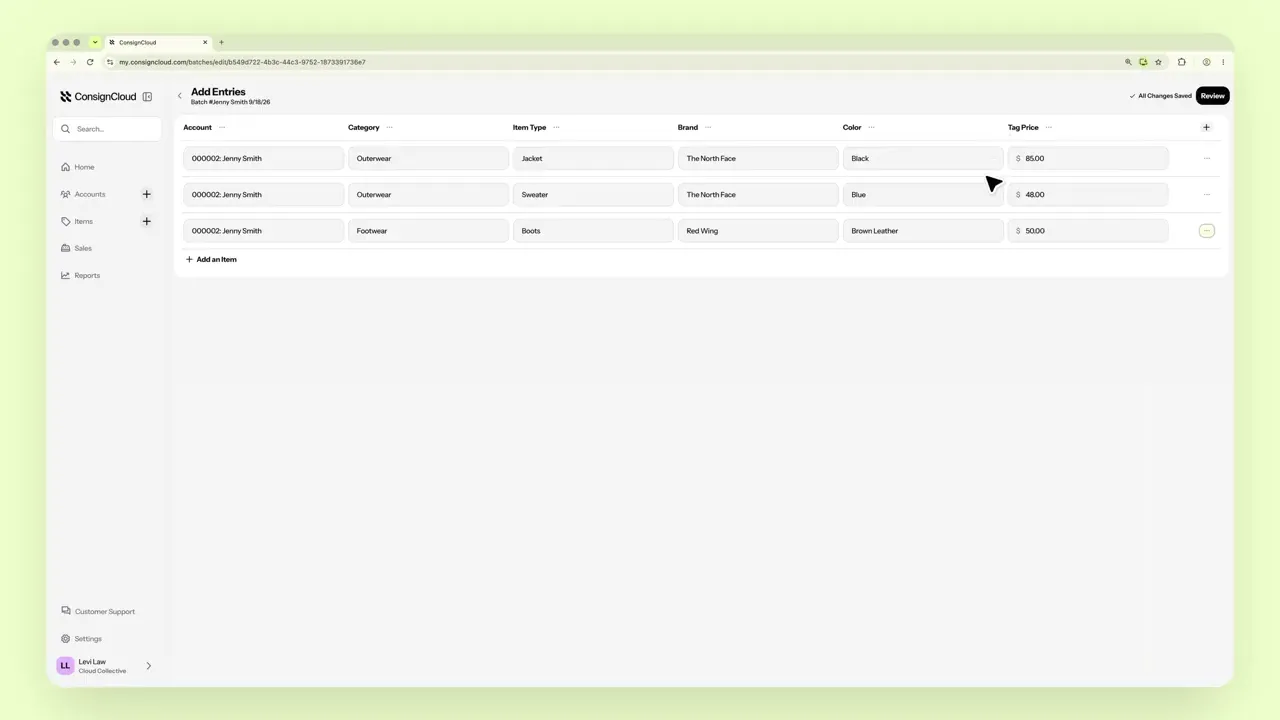
Add one item or a whole drop-off, with every detail tied to the right consignor.

Item Intake
Quick and accurate intake
Add one item or a whole drop-off, with every detail tied to the right consignor.
Item Intake
Quick and accurate intake
Add one item or a whole drop-off, with every detail tied to the right consignor.
What stores love about item intake in ConsignCloud
Fast Add Item Form
Customize the item form to fit your workflow.
Batch Entry
Enter a whole drop-off in a spreadsheet-style batch.
Copy Rows
Duplicate similar items instead of retyping them.
Save as You Go
Draft batches save your progress so nothing gets lost.
Tied to the Right Account
Every item links to its consignor from the start.
Flexible Inventory Type
Enter consignment, buy-outright, or retail items.
FAQs
What’s the fastest way to add a big drop-off?
Batches make adding items from a single drop off really easy. Go to the Items Table, choose Batches, and click Create New Batch.
What's the fastest way to add individual items?
The new item form makes it easy to add individual items and you can also create new items directly from the point of sale.
Do I need a batch number?
No, many stores will fill this in with the account name and date, but if you leave it blank, ConsignCloud will generate a batch number for you.
What inventory types can I add?
Every item is Consignment, Buy Outright, or Retail.
FAQs
What’s the fastest way to add a big drop-off?
Batches make adding items from a single drop off really easy. Go to the Items Table, choose Batches, and click Create New Batch.
What's the fastest way to add individual items?
The new item form makes it easy to add individual items and you can also create new items directly from the point of sale.
Do I need a batch number?
No, many stores will fill this in with the account name and date, but if you leave it blank, ConsignCloud will generate a batch number for you.
What inventory types can I add?
Every item is Consignment, Buy Outright, or Retail.
FAQs
What’s the fastest way to add a big drop-off?
Batches make adding items from a single drop off really easy. Go to the Items Table, choose Batches, and click Create New Batch.
What's the fastest way to add individual items?
The new item form makes it easy to add individual items and you can also create new items directly from the point of sale.
Do I need a batch number?
No, many stores will fill this in with the account name and date, but if you leave it blank, ConsignCloud will generate a batch number for you.
What inventory types can I add?
Every item is Consignment, Buy Outright, or Retail.



Ready to get started?
Ready to get started?
Product
Store Models
Store Types
© 2026 ConsignCloud LLC. All Rights Reserved.
Product
Store Models
Store Types
© 2026 ConsignCloud LLC. All Rights Reserved.
Product
Store Models
Store Types
© 2026 ConsignCloud LLC. All Rights Reserved.